Showing posts with label digital painting. Show all posts

Thursday, 3 December 2015

What if? Metropolis - Sendsel Final Concept Art (Updated)

More refined final composition, also with a few slight changes to lighting, I'm really trying to get across a strong sunset, but while also using a restricted but complimentary colour scheme. 


Monday, 26 October 2015

Photoshop Tutorial - Stag Beetle/Post Box

In today's tutorial we were focusing on  production art and were tasked with creating a form/structure from an object and and animal that we (literally) picked out a hat (box). I got a post box and Stag Beetle, so first step was research - see below my collected reference images. 


The second step was to start thumbnailing our ideas, so below are very quick thumbnail sketches of a few designs. 
In design #1, I thought the double wing of the beetle was a good feature to use for the 'door' of a free-standing 'English' postbox based structure.
Design #2 is based on the typical 'American style' house mailbox, with the wings being able to be flipped up to show the mailbox has items in it. This is my favourite design. 
Design #3 is based off of wall mounted mail boxes some houses have instead of letterboxes through front doors, the inner wings form the basket and the outer wings form the protective case, which open outwards and you reach into the inner basket to retrieve letters, with the antlers for decoration, as with he other designs.
Designs #4 and #5 stem from #3 but are more of a rounded/3D basket design than the more 2D wall mounted one. Both sets of wings open outwards, letting the enclosed letters fall out the bottom to be collected.


Friday, 23 October 2015

Invisible Cities: Baucis Establishing Shot Complete


Gif of process:

Invisible Cities: Baucis Exterior Low Angle Shot Complete


Gif of process:

Invisible Cities: Baucis - Building and Domes Development

I created more building thumbnails/forms, experimenting with the dome shape, using forms I created in Maya to help me, also creating multiple layers for one structure  so I could sandwich the plant forms into the dome and have it look like it was an actual bio dome. First I made it with an opaque white back layer, and later had to come back and re-do this to be transparent to appear as glass. I also put slight sheen/shadowing on the front panes to help with this effect. I also created the tall, hexagonal accommodation buildings the inhabitants of Baucis would live in. The windows are close and compact to conserve glass for the bio-domes, as it is not essential for the inhabitants to have large windows. For the dome on top I just duplicated the finished bio dome form and warped the item to make the base concave to fit the perspective. I also created a hexagonal and vine inspired cable cart to layer into my paintings. 


In a separate document I collaged natural forms copied from my interior shot into the completed dome form, creating different arrangements sandwiched in between the dome layers to create an assortment of bio-domes to be used in my establishing and low angle exterior shots. 


I then copied these dome arrangements into another document and merged the layers, creating a "flat" one layer image so the plants inside would not accidentally get moved when repositioning and resizing the domes. The initial domes I made I made with the opaque white background (left) and when I came to putting some of these into my low angle shot I realised how bad and fake this looked, so had to come back, re make the back layer as mentioned above, transfer this into the above document, then re make dome compositions and go through the same process again. This mistake cost me quite a lot of time and was a big frustration, but I'm glad I took the time to go back and fix the issue as I know if I hadn't my final outcomes would be nowhere near as convincing as they are now. I have put different background colours to show the difference between the opaque and translucent domes. 


I then created another document, duplicated my accommodation building into this a few times, then duplicated some of the domes from the above document on top of these, warping the bottom edge to fit perspective. Again I've used different background colours to show the dome transparency. 


Once I had flattened all the layers in the above documents, so each dome or building was made of just one layer, it was a simple matter of just duplicating these forms into my establishing and low exterior paintings and re sizing, arranging, flipping, rotating and changing the layers of the forms to create the sense of a "full" city, and give it depth and perspective. 


Thursday, 22 October 2015

Invisible Cities: Baucis Interior Shot Complete

Interior Shot is finally done! (also my first full digital painting ever) Took me absolutely hours but I'm really quite proud of the result.


Gif of process:


Now to just duplicate some of the trees into the bio-domes of my other two shots to get them finished off.


Invisible Cities: Interior Shot Progress

So... painting leaves/trees turned out to be trickier than I was anticipating. Spent a few hours this morning looking through tutorials, experimenting with different brushes and layers etc, and even downloaded a few new brushes, but I think I've finally found a way of creating masses of leaves that I'm happy with. The birch trees on the left were my first attempt at trees, and the partial branch on the right I'm particularly pleased with.


Close-up of overhanging partial branch - used 5 layers and 3 different brushes 


Invisible Cities: Interior Shot Final Plan

I'm so excited about this viewpoint, definitely my favourite of the 3. Here's my finished plan, with all the different plant layers, now to just start filling it all in tomorrow!


Invisible Cities: Establishing Shot Progress

Establishing shot progress so far, I'm determined to get this finished tonight. When I came to adding more buildings and thinking about colour earlier I realised I had made the quite large mistake of putting quite a few elements on the same layer, which simply was not going to work, so had to re- go over a lot of things, but I've learned from it and feel much more confident about this now. Still need to add the buildings and plants, add shine to the dome, plus want to work over the cliffs again to make them more angular, but I'm finally happy with the base shape.


Wednesday, 21 October 2015

Invisible Cities: Baucis Shot Developments

Exterior Establishing Shot viewpoint, still need to add in some extra buildings within the dome. I've had a lot of issues with sorting out layers and how to actually put elements together in these compositions because I am still very new when it comes to Photoshop and this doesn't help with the fact that I have a lot of overlapping structures. I think I'll need to go back to this and break the main building up into separate layers to be able to put in buildings, and add the side telescope platforms. 


Had similar layering difficulties with this shot. In the end I thought it better to restart, also because I really wasn't happy with the angle, it just looked too flat and small. 


This is the remade viewpoint, all layers sorted and just waiting to add in the accommodation buildings at the back then the smaller details like carts, vines and platforms. Also need to add some tree forms within the domes. Will do colour comps of this but already have a good idea of my colour scheme. 


My interior is largely based off of this thumbnail I did at the very beginning of the project. The idea of having multiple levels within the domes has really stuck with me.


My accommodation buildings are largely based off of this quick sketch in my book. Will be hexagonal with a dome on top, continuing the theme, and the windows are small but wide to conserve glass for the domes, and the buildings have platforms (some open air, some with domes) as personal gardens to provide as much greenery in the city as possible, and also make use of as much space as possible. 


However, I do feel like I'm definitely developing my knowledge and skill in Photoshop, I feel a lot more confident and capable with it than even just a few days ago. Cant wait to start adding the finer details, just need to re-layer a few things and duplicate in some more buildings. 

(It's such a good feeling to be actually enjoying set work for once. Even with previous art courses I don't think I've ever really experienced as much enthusiasm as I have with this about learning a new skill before.) 

Sunday, 18 October 2015

Invisible Cities: Baucis Building Development

These were my initial building thumbnails, I'm not all that proud of them: I wasnt really sure where I was going with them plus I really wasn't getting on with drawing in photoshop. 
However, 3 of them gave me a strong base with which to develop: top left the telescope silhouette, top right the bio-domes and bottom 2nd from the left I really liked the idea of a building with multiple platforms/struts coming off - which was my main inspiration for more complicated building developments.
I decided to keep developign in my sketchbook to actually just get some work down. 


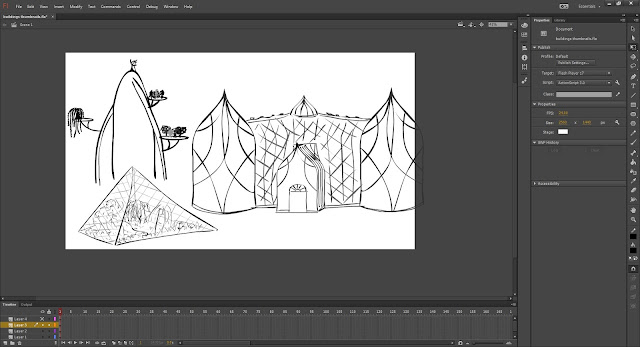
Then I had an introduction to Adobe Flash, and really liked how easy it was to draw in this program so used this to draw out some building ideas. 

I was having some issues transferring them over to Photoshop however and was worrying for a few days about developing city concept thumbnails in Photoshop because of my slight aversion to the program, and how time consuming it was not drawing in flash, but then trying to erase the white background that came with the image once I moved it from flash to Photoshop. However I had a short 1 to 1 with Jordan and he showed me some good tips on how to make drawing in Photoshop a little easier for myself, and also a way of importing just the line work from flash by exporting as a .PNG image (to have transparent backgrounds) so I could then go back into these images and add colour behind the line work to bring the building to life a little/give it tone. 
Below, the buildings on the bottom I didn't use the export method for, and had already spent some considerable time cropping out the background, and would still have to go back in and take out all the white within the building, but top right I exported and was left with just lines. 
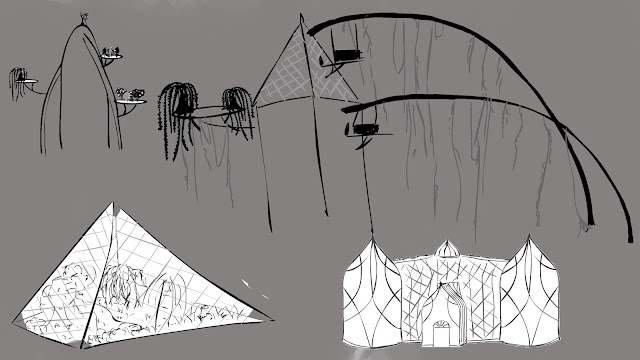
This building idea in particular stuck with me: it got me thinking about transport around the city, and we then kept being reminded by various tutors to think about the WHYs and HOWs of our city. 
I made some more planning pages in my sketch book, decided to go with a "nuclear fallout" idea stemming from from Phill's OGR feedback.


I was also having a hard time trying to visualise how my city would go together, decided it was time for another aerial plan of the city, which would in turn once I had figured out what would go where and why, would help me put together thumbnail compositions for each shot.
Decided my city was built for a reason so would have all things worked out, specifics, be as "green" as possible. 


Entire city has dome around it - protect from outside radiation and pollution. Therefore need to generate own water and air - from Steven OGR feedback, - sun beating down on dome uses condensation and warmth for most of dome. platform is slightly dipped in the middle, canals around edges of dome collect condensation water and flow it into the centre of the city. from all directions - have different city districts.  rivers flowing in provide transport and water to the city, once in centre use main terminus building to get back out again, cable carts use gravity to get out and down. Also have vines along cable cart struts - provide large amount of co2 to o2 all around city - air for all. some can have fruits growing for food.  There are still domes - provide mini environments for different reasons, in different districts, city layout is thought out, controlled. some environments for warmer/cooler climate specialised plants, some are intensive food growing, bioengineering etc. some are waste management eg compost for fertiliser for areas. Entire platform based on honeycomb structure, all flows, strong, but also easier shapes to build than circular, all buildings etc have 6 or 12 sides.

To develop from this I want to model the main terminus building in Maya so I can get a better idea of how it would look 3D so I can draw it properly in Photoshop for developing more thumbnails. Also I think modelling a simple entire city structure with the legs and dome over the entire thing would be a good idea. 


Wednesday, 30 September 2015

Photoshop Digital Painting Tutorial #2 - Word Stacks, Abstract Thumbnails, Lasso Tool

These Photoshop exercises were designed to get us to relax a little about thumbnails and show us that there doesn't always have to be a definite idea of what you are creating/drawing, and that ideas can be generated from abstract shapes and brush strokes. 

Firstly we were directed to create a "word stack", a continuous stream of conciousness in writing form of descriptions and ideas and links made in your mind about a chosen city, which is a great way of getting everything in your head down on paper quickly, which then acts as a great resource for planning and developing your work. Initially I chose to create a word stack of Esmeralda, because I was interested in the city and had not yet developed any thumbnails for it, but then decided to also do one for Baucis as this is my chosen city, but due to the open-ness of the description of the city itself I am taking on board inspiration from other cities I like, especially Esmeralda. 


Then we were given a thumbnail template in photoshop and directed to create abstract compositions from our word stack (stacks in my case) using only the brush tool. 


Next we were given the same task but using the lasso tool and polygonal lasso tool.


Lastly, we combined different abstract thumbnails through different layering techniques to see what might emerge from the abstractions.


Tuesday, 29 September 2015

Photoshop Digital Painting Tutorial #2 - Master Studies

These are my completed "master studies" from yesterdays photoshop tutorial. These were quick studies, we were given approximately 10 minutes per painting and they are an excellent way of developing digital painting skills so I will be completing more master studies in the future to help develop my skill. We were to focus on blocking in the bulk of the colour rather than focusing on the minute detail to help us work on tonal value and composition development. I experimented with using different brushes in each painting to see what different effects I could create and what was more effective. 
I believe my most successful study was #2, and if I had had more time I would have liked to go back into #4 with a harder edged brush to develop more definition in the rocks, however I feel I definitely got a good base tone layer down.


To help us assess if we were capturing the right tones of the works we were directed to also view our work in black and white, so we could see the depth of the tones in the colours and see how successfully we were creating the master studies. 


Monday, 21 September 2015

Photoshop Digital Painting Tutorial #1 - First Ever Digital Paintings

Today was my first digital painting class, using my Wacom tablet and photoshop. We were given approximately 20 minutes for each study, working on the black and white image first. Considering I'd never used the software or even a tablet before I am quite proud of the results; it definitely could have gone a lot worse.